


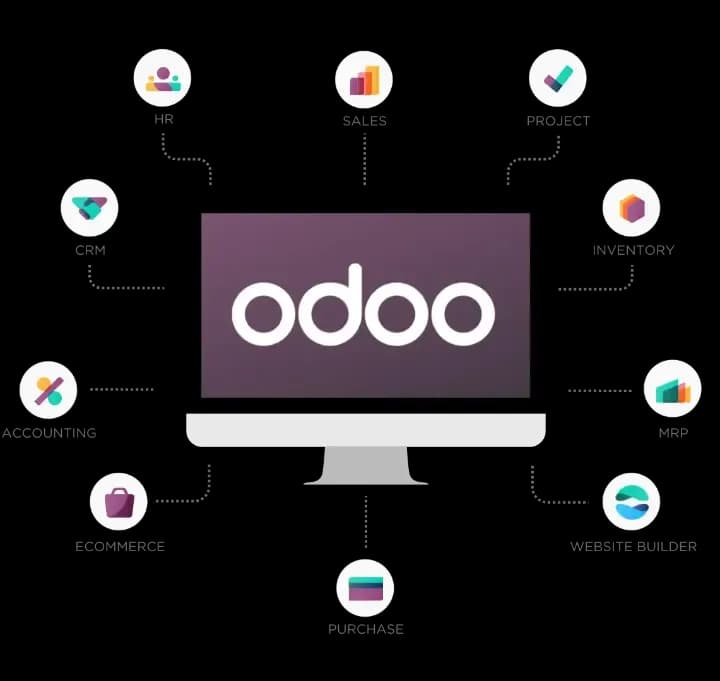
Short answer: Odoo ERP consists of more than 40 official modules (Odoo calls them "apps"), grouped into nine areas: finance, sales, websites, supply chain, human resources, marketing, services, productivity and customization. All modules share one database, so a sales order automatically reduces stock and creates an invoice in accounting. Most companies start with Sales, Purchase, Inventory and Accounting and add the other modules in phases.
The first time a business owner opens Odoo, they see dozens of app icons and ask: which of these does my business actually need? Getting it wrong is costly. Install everything and staff get lost in the menus; skip a key module and people go back to copying data between Excel, 1C and Telegram. Below is the complete list of Odoo ERP modules grouped by area: what each one does, where to start, and typical bundles by industry.
What is an Odoo module and how do modules work together?
An Odoo module (app) is a part of the system that automates one business task and shares a single database with every other module. Odoo's strength lies in this modular structure: each business picks the modules it needs and expands the system later.
Technically, Odoo has two levels:
- Apps: the large blocks users see on the home screen, such as CRM, Sales, Inventory and Accounting.
- Technical modules: smaller building blocks and dependencies inside apps. For example, installing Sales automatically adds Invoicing so you can bill customers.
Because every module runs on one database, data is entered only once. A simple example:
- A salesperson confirms an order in Sales.
- Inventory automatically creates a delivery order, and stock goes down when the goods ship.
- Accounting generates the invoice, and the customer's balance is cleared when payment arrives.
- The customer's record in CRM shows the full history: inquiry, quotation, order and payment.
Nobody enters data twice, and management sees sales, stock and cash in one place.

Which modules does Odoo have? A quick map by area
Odoo's official apps fall into nine areas, and some of them are available only in the paid Enterprise edition. Here is the overall map:
- Finance: Accounting, Invoicing, Expenses, Payroll, Documents, Sign.
- Sales: CRM, Sales, Point of Sale (POS), Subscriptions, Rental.
- Websites: Website Builder, eCommerce, Blog, Forum, Live Chat, eLearning.
- Supply chain: Inventory, Barcode, Purchase, Manufacturing, PLM, Quality, Maintenance, Repairs.
- Human resources: Employees, Recruitment, Time Off, Attendances, Appraisals, Fleet.
- Marketing: Email and SMS Marketing, Social Marketing, Marketing Automation, Events, Surveys.
- Services: Project, Timesheets, Helpdesk, Field Service, Planning, Appointments.
- Productivity: Discuss, Calendar, To-Do, Knowledge, Approvals, VoIP, IoT.
- Customization: Studio.
"(Enterprise)" below means the module exists only in the paid edition. The split shifts slightly between versions; full comparison: Odoo Community vs Enterprise.
What do the Odoo finance modules do?
Finance modules track the movement of money: invoices, payments, bank, expenses and financial reports.
- Accounting (Enterprise): chart of accounts, journals, bank reconciliation, multi-currency (sum, dollar, euro), receivables and payables, analytic accounting, budgets, balance sheet and P&L. More detail: the Odoo Accounting module.
- Invoicing: customer invoices, vendor bills and payments. Also in Community, and enough as the main finance tool for many small companies.
- Expenses: employee travel, fuel and other expenses: receipt photo, manager approval, reimbursement.
- Payroll (Enterprise): salary calculation. Uzbek taxes and contributions need separate configuration or localization, so scope it as its own workstream.
- Documents, Spreadsheet and Sign (Enterprise): document archive, spreadsheet reports and e-signing of contracts. Legally binding tax documents in Uzbekistan are still signed with an ERI digital signature through operators such as Didox.
Sales modules: CRM, Sales and Point of Sale
The sales area covers the customer's path from first inquiry to order and payment.
- CRM: leads and opportunities, a kanban pipeline, activities (calls, meetings), lead scoring and forecasts. Website and email leads arrive automatically; Telegram is connected through an integration. More detail: Odoo CRM.
- Sales: quotations and templates, pricelists and discounts, online confirmation by the customer, sales orders, then delivery and invoicing.
- Point of Sale: a till for shops and restaurants: barcode scanning, several payment methods, offline mode, loyalty programs and gift cards, and a restaurant mode (floors, tables, kitchen orders).
- Subscriptions (Enterprise): recurring billing, for example automatic invoices for monthly service contracts.
- Rental (Enterprise): renting out equipment or products: booking, pickup and return.
How Sales and Purchase work together: Odoo Sales and Purchase.
Website and online sales modules
The website area lets you run a site and an online store inside Odoo, with orders and stock linked directly to the ERP.
- Website Builder: pages built from ready-made blocks, multiple languages (Uzbek, Russian, English), SEO settings.
- eCommerce: catalogue, cart and online checkout. Stock comes from Inventory and prices from the pricelist. Payme or Click payments are usually connected with an extra integration module.
- Blog, Forum and eLearning: content marketing, a customer community and online courses.
- Live Chat: website chat; a conversation can be turned into a lead in one click.
Supply chain modules: Inventory, Purchase and Manufacturing
Supply chain modules manage how goods and raw materials move from the supplier to the customer.
- Inventory: multiple warehouses and locations, routes, lots and serial numbers, expiration dates, minimum-stock reordering rules, stock counts, and valuation (FIFO or average cost). More detail: Odoo Inventory.
- Barcode (Enterprise): receiving, picking, shipping and counting with a scanner or mobile device.
- Purchase: requests for quotation (RFQs), purchase orders, vendor prices and lead times, and matching of order, receipt and vendor bill.
- Manufacturing: bills of materials (BoM), manufacturing orders, work centers, component consumption, output and costing. Shop floor and work order scheduling are richer in Enterprise. More detail: Odoo Manufacturing.
- PLM (Enterprise): product and BoM versions, approval of engineering changes.
- Quality (Enterprise): control points, checks and quality alerts.
- Maintenance: equipment register, preventive and corrective maintenance, downtime history.
- Repairs: repair orders for customer products, spare parts and labour.
What do the HR modules include?
HR modules keep everything about an employee in one place, from hiring to time off and reviews.
- Employees: employee records, departments, job positions, org chart, documents.
- Recruitment: job openings, a candidate pipeline, interviews and offers.
- Time Off: leave and sick-day requests, approvals and remaining balances.
- Attendances: check-in and check-out, including a kiosk mode.
- Appraisals and Referrals (Enterprise): performance reviews and hiring through employee referrals.
- Fleet: company vehicles, contracts, servicing and costs.
More detail: the Odoo HR module.
Marketing and service modules
Marketing modules bring customers in, while service modules manage projects and after-sales work.
Marketing:
- Email and SMS Marketing: mass mailings, segments, open and click stats.
- Social Marketing (Enterprise): scheduling and analysing social media posts.
- Marketing Automation (Enterprise): rule-based campaigns, such as a follow-up email three days after a new lead.
- Events and Surveys: events with registration, surveys and quizzes.
Services:
- Project: tasks, stages, deadlines and owners; Gantt view in Enterprise.
- Timesheets: time logged against tasks and invoiced on that basis.
- Helpdesk (Enterprise): support tickets, SLA deadlines, customer portal.
- Field Service (Enterprise): on-site work by technicians and installers.
- Planning and Appointments (Enterprise): shift planning and online booking for customers.
Productivity modules and Studio
This group makes the team's daily work easier and lets you adapt Odoo without programming.
- Discuss: internal chat and channels, plus a conversation thread on every record.
- Calendar and To-Do: meetings and personal tasks.
- Knowledge (Enterprise): an internal knowledge base and how-to guides.
- Approvals (Enterprise): approval chains for purchases, expenses and other requests.
- VoIP (Enterprise): calling from Odoo over IP telephony. If salespeople call from ordinary mobile phones, Deep Vision's own dooCall tracks and controls those calls.
- IoT (Enterprise): connecting scales, printers, scanners and other devices.
- Studio (Enterprise): new fields, forms, reports and simple apps without a developer.
Beyond the official list: Odoo Apps and integrations for Uzbekistan
Beyond the official apps, the Odoo Apps store offers thousands of partner and community modules, and unique needs are met with custom modules.
What companies in Uzbekistan need most often:
- E-invoicing (Didox): sending and receiving e-invoices directly from Odoo. Deep Vision has a ready-made module for this.
- Asl Belgisi product marking: receiving, selling and writing off marking codes. We have a ready-made module for this too.
- Tax and accounting setup: VAT, the national chart of accounts, report formats.
- Payment systems: Payme, Click and bank integrations.
- Telegram: taking orders through a bot, notifications, sending leads to CRM.
- Data migration from 1C: stock balances, customers and suppliers, product catalogue.
Before installing a third-party module, check its Odoo version and who maintains it: a poorly built module is usually the biggest obstacle at upgrade time.
Which Odoo modules should you start with?
For most companies the best path is to launch the money and goods flow first (Sales, Purchase, Inventory, Accounting), then add CRM and industry modules, and leave marketing for later. Installing everything at once scatters the team and drags the project out.
Recommended order:
- Core: Sales, Purchase, Inventory, and Invoicing or Accounting. This gives you correct stock, prices and receivables. Standard Sales and Inventory modules often go live in 6–8 weeks.
- Industry module: Manufacturing for producers, POS for shops and restaurants, Project and Timesheets for service firms.
- Customer work: CRM, and later Helpdesk if needed.
- Internal processes: Employees, Time Off, Attendances, Expenses, Approvals.
- Growth: website, online store, marketing and Studio customizations.
A typical Odoo implementation takes 2–6 months, depending on modules, integrations and data quality.
Two rules: name one internal owner per module, and don't install anything "just in case", because every extra module clutters the menus and needs training.
Typical Odoo module bundles by industry
The right bundle depends on your business model: the lists below are a starting point, and the final choice comes after a process review.
- Wholesale and distribution: CRM, Sales (pricelists, credit limits), Purchase, Inventory with Barcode, Accounting, Didox integration, and Asl Belgisi for marked goods. Example: Timsoll manages more than 7,000 SKUs in Odoo.
- Retail and supermarkets: POS, Inventory, Purchase, Accounting, loyalty, marking at the till, optionally eCommerce.
- Restaurants and HoReCa: POS in restaurant mode, Inventory, Purchase, dish recipes as BoMs (Manufacturing), Accounting.
- Manufacturing: Manufacturing, Inventory, Purchase, Sales, Accounting, and later Quality, Maintenance and PLM.
- Construction: Project, Purchase, Inventory (site warehouses), Accounting with analytics per site, Timesheets, Documents.
- Services, IT and agencies: CRM, Sales, Project, Timesheets, Helpdesk, Subscriptions or Invoicing.
- Logistics and delivery: Inventory, Sales, Fleet, Accounting, optionally Field Service or Planning.
- Training centres: CRM, eLearning, Events, Invoicing or Subscriptions.
How does the number of modules affect cost?
Odoo Enterprise is priced per user and the current paid plans include all apps, so project cost depends more on configuration, integrations and data migration than on the number of modules. Community is free but lacks Enterprise modules, and hosting still costs money. There is a free single-app plan; Studio needs the Custom plan. Check odoo.com/pricing for current terms.
Implementation cost grows with:
- each additional module to analyse and configure;
- integrations: Didox, Asl Belgisi, banks, Payme, Click, Telegram;
- data migration from 1C or Excel;
- custom reports, custom modules and training.
Checklist for choosing Odoo modules
Before you sign off the module list, answer these questions:
- Are your core processes, from order to payment, written down?
- Which process loses the most money or time today?
- Which modules are needed in phase one, and which can wait?
- Are the modules you need in Community, or do you need Enterprise?
- Which integrations are mandatory: Didox, Asl Belgisi, bank, Payme, Click, Telegram?
- What data will be migrated, and how clean is it?
- Do you know the users, their roles and an owner for each module?
How does Deep Vision help choose and implement Odoo modules?
Deep Vision is an official Odoo Gold Partner in Tashkent: we build the module map around your processes and roll the modules out in phases.
- Diagnostics: which module solves which problem, and what can wait.
- Configuration: we use standard features as far as possible and build custom code only where it is truly needed.
- Local integrations: we have ready-made modules for Didox e-invoicing and Asl Belgisi marking.
- Migration and training: data from Excel or 1C, hands-on sessions for each module's users.
Our team has 7 certified Odoo specialists, and 26 of our client projects are listed in the Odoo partner directory. Clients include Optika.uz, Timsoll and RockBeton. More about the service: Odoo implementation; about the platform: our Odoo page.
Let's find the module mix that fits your business: fill in the brief.
Frequently asked questions
How many modules does Odoo have?
Official Odoo has more than 40 apps across finance, sales, websites, supply chain, HR, marketing, services and productivity, plus thousands of extra modules in the Odoo Apps store.
Can I buy Odoo modules separately?
Current Enterprise plans are priced per user and include all apps; there is also a free single-app plan. Plans change, so check odoo.com/pricing.
Which modules are in the free Community edition?
Community includes CRM, Sales, Purchase, Inventory, Invoicing, basic Manufacturing, POS, Website, eCommerce, Project, Employees, Time Off and Recruitment. Full Accounting, Studio, Helpdesk, Quality, PLM and Payroll are Enterprise only.
Does Odoo support Uzbek taxes and e-invoicing?
Not fully out of the box: VAT, the chart of accounts and reports are configured, and Didox exchange is added through an integration. Deep Vision has ready-made Odoo modules for Didox and Asl Belgisi.
Can I add modules later?
Yes, that is one of Odoo's main advantages. A new module works with existing data straight away: add CRM, and your customers and sales history are already there. Plan time for setup and training.
Which modules are enough for a small business?
A small trading company usually needs Sales, Purchase, Inventory and Invoicing, plus CRM once it has salespeople. A shop can start with POS and Inventory, a service firm with CRM, Project and Invoicing.
Can Odoo run alongside 1C?
Technically yes, but keeping the same data in two systems breeds errors. Companies usually move operations to Odoo first, then accounting.
Does Odoo work in Russian and Uzbek?
Russian is fully translated. Uzbek is in the language list, but the standard translation may not cover every screen, so check your version or ask your partner to complete key screens.
Summary
Odoo lets you install only what you need and extend the system as you grow. Want to know which Odoo modules your company actually needs? Fill in the brief for a free consultation or call +998 77 093 00 07.